Saturday, 9 September 2017

Cursor Replacement : By creating dynamic query.

We have a situation where we have to store product details in Product table and Product features in ProductFeatures Table using single screen.

So We'll insert Product details in Product table and get its product to insert product features in
ProductFeatures table.

We will use two Procedures and one Function to achieve this.

We will use dynamic query :

DECLARE @ExecQuery NVARCHAR(MAX);
  SELECT @ExecQuery  = COALESCE(@ExecQuery +';' ,'') + 'EXEC [dbo].[Usp_AddProductFeatures] '+CAST(@PId AS VARCHAR)+', '''+ CAST(GETDATE() AS VARCHAR) +''', ''' + Element+''', ''+|+'''
  FROM dbo.func_split(@ProductFeatures, '*|*');

  EXECUTE sp_executesql @ExecQuery;

Example : Passing some values to @ProductFeatures and Lets see output using print.

  DECLARE @ExecQuery NVARCHAR(MAX);
  SELECT @ExecQuery  = COALESCE(@ExecQuery +';' ,'') + 'EXEC [dbo].[Usp_AddProductFeatures] '+CAST(1 AS VARCHAR)+', '''+ CAST(GETDATE() AS VARCHAR) +''', ''' + Element+''', ''+|+'''
  FROM dbo.func_split('Feature 01*|*Feature 02*|*Feature 03', '*|*');

  print @ExecQuery

Output:

  EXEC [dbo].[Usp_AddProductFeatures] 1, 'Sep  9 2017  3:48PM', 'Feature 01', '+|+';
  EXEC [dbo].[Usp_AddProductFeatures] 1, 'Sep  9 2017  3:48PM', 'Feature 02', '+|+';
  EXEC [dbo].[Usp_AddProductFeatures] 1, 'Sep  9 2017  3:48PM', 'Feature 03', '+|+'

Result : If we execute @ExecQuery, all queries will be executed one by one.

Practical Example 1 : With Only one value to be inserted into ProductFeatures table.

Step 1 : Create function

CREATE FUNCTION [dbo].[func_Split]
    (  
    @DelimitedString    varchar(8000),
    @Delimiter              varchar(100)
    )
RETURNS @tblArray TABLE
    (
    ElementID   int IDENTITY(1,1),  -- Array index
    Element     varchar(1000)               -- Array element contents
    )
AS
BEGIN

    -- Local Variable Declarations
    -- ---------------------------
    DECLARE @Index      smallint,
                    @Start      smallint,
                    @DelSize    smallint

    SET @DelSize = LEN(@Delimiter)

    -- Loop through source string and add elements to destination table array
    -- ----------------------------------------------------------------------
    WHILE LEN(@DelimitedString) > 0
    BEGIN

        SET @Index = CHARINDEX(@Delimiter, @DelimitedString)

        IF @Index = 0
            BEGIN

                INSERT INTO
                    @tblArray
                    (Element)
                VALUES
                    (LTRIM(RTRIM(@DelimitedString)))

                BREAK
            END
        ELSE
            BEGIN

                INSERT INTO
                    @tblArray
                    (Element)
                VALUES
                    (LTRIM(RTRIM(SUBSTRING(@DelimitedString, 1,@Index - 1))))

                SET @Start = @Index + @DelSize
                SET @DelimitedString = SUBSTRING(@DelimitedString, @Start , LEN(@DelimitedString) - @Start + 1)

            END
    END

    RETURN
END

Step 2 : Create first procedure to insert product details in product table and pass values to insert product features to productfeatures table using dynamic query.


CREATE PROC [dbo].[Usp_InsertProductAndFeatures]
@ProductName NVARCHAR(MAX),
@CategoryId INT,
@ProductFeatures VARCHAR(MAX)
AS
BEGIN
   DECLARE @PId INT
   DECLARE @Feature VARCHAR(MAX)

   INSERT Products
   (
   ProductName,
   CategoryID,
   CreatedOn
    )
   VALUES
   (
   @ProductName,
   @CategoryId,
   GETDATE()
    );

  SET @PId= @@IDENTITY;

  DECLARE @ExecQuery NVARCHAR(MAX);
  SELECT @ExecQuery  = COALESCE(@ExecQuery +';' ,'') + 'EXEC [dbo].[Usp_AddProductFeatures] '+CAST(@PId AS VARCHAR)+', '''+ CAST(GETDATE() AS VARCHAR) +''', ''' + Element+''', ''+|+'''
  FROM dbo.func_split(@ProductFeatures, '*|*');

  EXECUTE sp_executesql @ExecQuery;

END


Step 3 : Create second procedure to insert product features.

CREATE PROCEDURE [dbo].[Usp_AddProductFeatures]
     (
   @PId INT,
   @CreatedDate DATETIME,
   @element    VARCHAR(MAX),
   @delimiter VARCHAR(MAX)
     )
AS
BEGIN
  DECLARE @result BIT = 0;

  ;WITH prodFeature AS(
   SELECT * FROM dbo.func_split(@element, '+|+')
  )

     INSERT INTO ProductFeatures
  (
   ProductId,
   CreatedOn,
   ProductFeature
  )
    VALUES
    (
     @PId,
     @createdDate,
     (select Element from prodFeature where elementId = 1)
    )
     RETURN @result

END

==================================================================
Practical Example 2 : With multiple value to be inserted into ProductFeatures table.

For multiple values we'll pass all values to @ProductFeature separating them with delimiter +|+ like : If we have to pass product feature, its type and it made in details then we can pass in single string separated by +|+ as shown below :

ProductFeature+|+Type+|+Made In Details

Example : 

'Feature 01+|+New+|+Made In India*|*Feature 02+|+Old+|+Made In China*|*Feature 03+|+New+|+Made In India'

Note the output of the following query :


Select * from  dbo.func_split('Feature 01+|+New+|+Made In India*|*Feature 02+|+Old+|+Made In China*|*Feature 03+|+New+|+Made In India','*|*')


Note the output of the following query :


DECLARE @ExecQuery NVARCHAR(MAX);
SELECT @ExecQuery  = COALESCE(@ExecQuery +';' ,'') + 'EXEC [dbo].[Usp_AddProductFeatures] '+CAST(1 AS VARCHAR)+', '''+ CAST(GETDATE() AS VARCHAR) +''', ''' + Element+''', ''+|+'''
  FROM dbo.func_split('Feature 01+|+New+|+Made In India*|*Feature 02+|+Old+|+Made In China*|*Feature 03+|+New+|+Made In India', '*|*');

  print @ExecQuery

Output : 

EXEC [dbo].[Usp_AddProductFeatures] 1, 'Sep  9 2017  9:48PM', 'Feature 01+|+New+|+Made In India', '+|+';
EXEC [dbo].[Usp_AddProductFeatures] 1, 'Sep  9 2017  9:48PM', 'Feature 02+|+Old+|+Made In China', '+|+';

EXEC [dbo].[Usp_AddProductFeatures] 1, 'Sep  9 2017  9:48PM', 'Feature 03+|+New+|+Made In India', '+|+'

So we'll use this way as :

DECLARE @ExecQuery NVARCHAR(MAX);
SELECT @ExecQuery  = COALESCE(@ExecQuery +';' ,'') + 'EXEC [dbo].[Usp_AddProductFeatures] '+CAST(@PId AS VARCHAR)+', '''+ CAST(GETDATE() AS VARCHAR) +''', ''' + Element+''', ''+|+'''
  FROM dbo.func_split(@ProductFeatures, '*|*');

  EXECUTE sp_executesql @ExecQuery;

Example Steps : 

Step 1 : We have already created function [dbo].[func_Split].

Step 2 : We have already created first procedure [dbo].[Usp_InsertProductAndFeatures] to insert product details in product table and pass values to insert product features to productfeatures table using dynamic query.

Step 3 :  Create second procedure to insert product features with slight change as :

CREATE PROCEDURE [dbo].[Usp_AddProductFeatures]
     (
   @PId INT,
   @CreatedDate DATETIME,
   @element    VARCHAR(MAX),
   @delimiter VARCHAR(MAX)
     )
AS
BEGIN
  DECLARE @result BIT = 0;

  ;WITH prodFeature AS(
   SELECT * FROM dbo.func_split(@element, '+|+')
  )

     INSERT INTO ProductFeatures
  (
   ProductId,
   CreatedOn,
   ProductFeature,
   Type,
   MadeInDetail
  )
    VALUES
    (
     @PId,
     @createdDate,
     (select Element from prodFeature where elementId = 1),
     (select Element from prodFeature where elementId = 2),
     (select Element from prodFeature where elementId = 3)
    )
     RETURN @result

END

Note the output of CTE prodFeature we have used in our last step.

;WITH prodFeature AS(
   SELECT * FROM dbo.func_split('Feature 01+|+New+|+Made In India', '+|+')
  )

  Select * from prodFeature

Friday, 18 August 2017

Miscellaneous


  1. The FormData interface provides a way to easily construct a set of key/value pairs representing form fields and their values, which can then be easily sent using the XMLHttpRequest.send() method. It uses the same format a form would use if the encoding type were set to "multipart/form-data".
================================================================

Datatable.Net Grid Event Bind For Paging

 $("a[data-dt-idx]").click(function(){
            $(".btnUrl").off().click(function () {
                vDialog.OpenURL($(this).attr("url"));
            });

            $(".btnEdit").off().click(function () {
                window.location.href = "/Event/ManageEvent?eid=" + $(this).attr("eid");
            });

            $(".btnDelete").off().click(function () {
                vDialog.DeleteEvent($(this).attr("eid"));
            });
        });

=========================================================
Get Query String using jquery

$.urlParam = function (name) {
    var results = new RegExp('[\?&]' + name + '=([^&#]*)')
                      .exec(window.location.href);

    return results[1] || 0;
}

Call method to get query string

 mid: $.urlParam("mid")
or
var mid = $.urlParam("mid")

------------------------------------------------------------------------------------------------------

Create file and directory


Create file and directory 
We can use System.IO.Directory.CreateDirectory

Any and all directories specified in path are created, unless they already exist or unless some part of path is invalid. The path parameter specifies a directory path, not a file path. If the directory already exists, this method does nothing.

                    // Creating Directory using static methods in class FlowHelper
                    string folderPath = Server.MapPath("/FileUpload");
                    FlowHelper.CreateDirectoryIfNotExists(folderPath);

                    // Saving file to given folder
                    string ext = Path.GetExtension(postedFile.FileName);
                    if (ext == ".jpg" || ext == ".png" || ext == ".jpeg" || ext == ".gif")
                    {
                    string filePath = "";
                    filePath = "/FileUpload/" + "abc" + ext;
                    string path = Server.MapPath(filePath);
                    postedFile.SaveAs(path);
                    }

                    // Deleting file  using static method in class FlowHelper
                    bool fileDeleted = FlowHelper.TryToDeleteFile(path);


    public class FlowHelper
    {
        public static bool CreateDirectoryIfNotExists(string folderPath)
        {
            try
            {
                bool folderExists = Directory.Exists((folderPath));
                if (!folderExists)
                {
                    Directory.CreateDirectory((folderPath));
                    return true;
                }
                else
                {
                    return true;
                }
            }
            catch
            {
                throw;
            }
        }
        public static bool TryToDeleteFile(string filePath)
        {
            try
            {
                if (File.Exists(filePath))
                {
                    File.Delete(filePath);
                    return true;
                }
                else
                {
                    return false;
                }
            }
            catch
            {
                throw;
            }
        }
    }

Sunday, 13 August 2017

Part 4 : CRUD in ASP.NET MVC using jquery modal popup.

What we want to achieve?

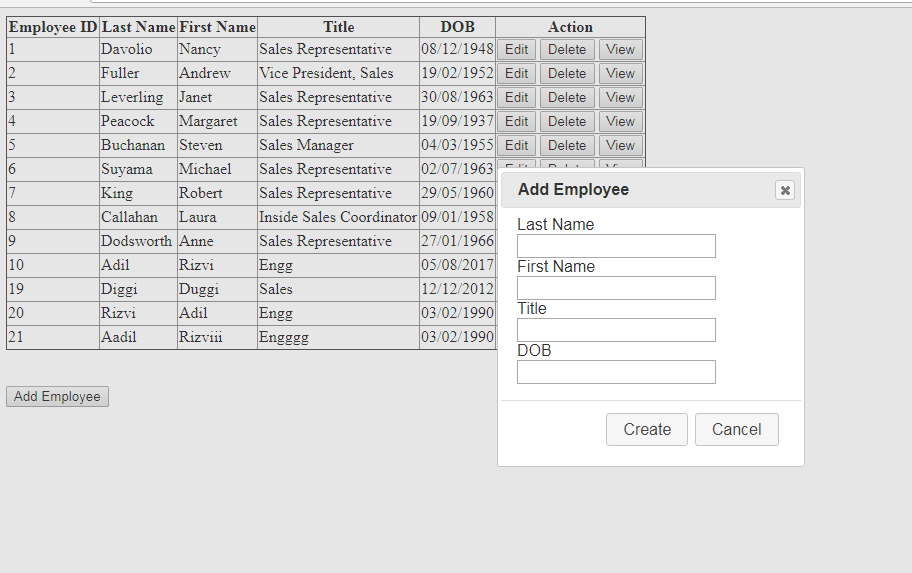
1.) We want to display list of employee in table as shown figure.

2) When we click Add Employee button, modal popup show open to add employee.


3) When  we click Edit button, modal popup show open to edit employee


Project Solution is name as SampleMvc.


In SQLHELPER Class : Inherited by data access class.

using System;
using System.Collections.Generic;
using System.Data;
using System.Data.SqlClient;
using System.Linq;
using System.Text;
using System.Configuration;

namespace SampleMvc.DA
{
    /// <summary>
    /// Summary description for Class_SQLHelper
    /// </summary>
    public class SQLHelper
    {
        private SqlCommand cmd = new SqlCommand();
        private SqlConnection conn;
        private bool bool_Status;
        private string str_Error;

        public SQLHelper()
        {
            conn = new SqlConnection(ConfigurationManager.ConnectionStrings["DBCS"].ToString());
        }

        protected void OpenConnection()
        {
            try
            {
                if (conn.State != ConnectionState.Open)
                    conn.Open();
            }
            catch (Exception ex)
            {
                OperationStatus = false;
                ErrorMessage = "Error : " + ex.Message;
            }
        }

        protected void CloseConnection()
        {
            try
            {
                if (conn.State != ConnectionState.Closed)
                    conn.Close();
            }
            catch (Exception ex)
            {
                OperationStatus = false;
                ErrorMessage = "Error : " + ex.Message;
            }
        }

        public SqlConnection Connection
        {
            get { return conn; }
        }

        public SqlCommand Command
        {
            get { return cmd; }
            set { cmd = value; }
        }

        public bool OperationStatus
        {
            get { return bool_Status; }
            set { bool_Status = value; }
        }

        public string ErrorMessage
        {
            get { return str_Error; }
            set { str_Error = value; }
        }

        /// <summary>
        /// Constructs a SqlCommand with the given parameters. This method is normally called
        /// from the other methods and not called directly. But here it is if you need access
        /// to it.
        /// </summary>
        /// <param name="qry">SQL query or stored procedure name</param>
        /// <param name="type">Type of SQL command</param>
        /// <param name="args">Query arguments. Arguments should be in pairs where one is the
        /// name of the parameter and the second is the value. The very last argument can
        /// optionally be a SqlParameter object for specifying a custom argument type</param>
        /// <returns></returns>
        public SqlCommand CreateCommand(string qry, CommandType type, params object[] args)
        {
            SqlCommand cmd = new SqlCommand(qry, conn);
            OpenConnection();
            // Set command type
            cmd.CommandType = type;

            // Construct SQL parameters
            for (int i = 0; i < args.Length; i++)
            {
                if (args[i] is string && i < (args.Length - 1))
                {
                    SqlParameter parm = new SqlParameter();
                    parm.ParameterName = (string)args[i];
                    parm.Value = args[++i];
                    cmd.Parameters.Add(parm);
                }
                else if (args[i] is SqlParameter)
                {
                    cmd.Parameters.Add((SqlParameter)args[i]);
                }
                else throw new ArgumentException("Invalid number or type of arguments supplied");
            }

            return cmd;
        }

        /// <summary>
        /// Executes a stored procedure that returns no results
        /// </summary>ExecNonQueryProc
        /// <param name="proc">Name of stored proceduret</param>
        /// <param name="args">Any number of parameter name/value pairs and/or SQLParameter arguments</param>
        /// <returns>The number of rows affected</returns>
        public int ExecNonQueryProc(string proc, params object[] args)
        {

            int result = 0;
            //using (conn)
            //{
            //    OpenConnection();
                using (SqlCommand cmd = CreateCommand(proc, CommandType.StoredProcedure, args))
                {
                    result= cmd.ExecuteNonQuery();
                    CloseConnection();
                    return result;
                }
            //}
        }

        /// <summary>
        /// Executes a query that returns a single value
        /// </summary>
        /// <param name="proc">Name of stored proceduret</param>
        /// <param name="args">Any number of parameter name/value pairs and/or SQLParameter arguments</param>
        /// <returns>Value of first column and first row of the results</returns>
        public object ExecScalarProc(string qry, params object[] args)
        {
            using (SqlCommand cmd = CreateCommand(qry, CommandType.StoredProcedure, args))
            {
                return cmd.ExecuteScalar();
            }
        }

        /// <summary>
        /// Executes a stored procedure and returns the results as a SqlDataReader
        /// </summary>
        /// <param name="proc">Name of stored proceduret</param>
        /// <param name="args">Any number of parameter name/value pairs and/or SQLParameter arguments</param>
        /// <returns>Results as a SqlDataReader</returns>
        public SqlDataReader ExecDataReaderProc(string qry, params object[] args)
        {
            using (SqlCommand cmd = CreateCommand(qry, CommandType.StoredProcedure, args))
            {
                return cmd.ExecuteReader();
            }
        }

        /// <summary>
        /// Executes a stored procedure and returns the results as a Data Set
        /// </summary>
        /// <param name="proc">Name of stored proceduret</param>
        /// <param name="args">Any number of parameter name/value pairs and/or SQLParameter arguments</param>
        /// <returns>Results as a DataSet</returns>
        public DataSet ExecDataSetProc(string qry, params object[] args)
        {
            using (SqlCommand cmd = CreateCommand(qry, CommandType.StoredProcedure, args))
            {
                SqlDataAdapter adapt = new SqlDataAdapter(cmd);
                DataSet ds = new DataSet();
                adapt.Fill(ds);
                return ds;
            }
        }

        /// <summary>
        /// Executes a stored procedure and returns the results as a Data Set
        /// </summary>
        /// <param name="proc">Name of stored proceduret</param>
        /// <param name="args">Any number of parameter name/value pairs and/or SQLParameter arguments</param>
        /// <returns>Results as a DataTable</returns>
        public DataTable ExecDataTableProc(string qry, params object[] args)
        {
            using (SqlCommand cmd = CreateCommand(qry, CommandType.StoredProcedure, args))
            {
                SqlDataAdapter adapt = new SqlDataAdapter(cmd);
                DataTable dt = new DataTable();
                adapt.Fill(dt);
                return dt;
            }
        }

        /// <summary>
        /// Executes a stored procedure and returns the results as a Data Set
        /// </summary>
        /// <param name="proc">Name of stored proceduret</param>
        /// <returns>Results as a DataTable</returns>
        public DataTable ExecDataTableProc(string qry)
        {
            using (SqlCommand cmd = CreateCommand(qry, CommandType.StoredProcedure))
            {
                SqlDataAdapter adapt = new SqlDataAdapter(cmd);
                DataTable dt = new DataTable();
                adapt.Fill(dt);
                return dt;
            }
        }
    }

}

In Modal Class Library :

using System;
using System.Collections.Generic;
using System.Linq;
using System.Text;

namespace SampleMvc.Models
{
    public class Employee
    {
        public int EmployeeID { get; set; }
        public string LastName { get; set; }
        public string FirstName { get; set; }
        public string Title { get; set; }
        public DateTime BirthDate { get; set; }
    }
}

In Data Access Class Library :

using System;
using System.Collections.Generic;
using System.Linq;
using System.Text;
using SampleMvc.Models;
using System.Data.SqlClient;
using System.Data;

namespace SampleMvc.DA
{
    public class EmployeeDA : SQLHelper
    {
        public void AddEmployee(Employee emp)
        {
            try
            {
                int i = ExecNonQueryProc("Usp_AddEmployee",
                new SqlParameter("@LastName", emp.LastName),
                new SqlParameter("@FirstName", emp.FirstName),
                new SqlParameter("@Title", emp.Title),
                new SqlParameter("@Birthdate", emp.BirthDate));
            }
            catch (Exception ex)
            {
                ErrorMessage = "Error : " + ex.Message;
                OperationStatus = false;
            }
            finally
            {
                CloseConnection();
            }
        }
        public DataTable GetAllEmployees()
        {
            DataTable dt = new DataTable();
            dt = ExecDataTableProc("Usp_GetAllEmployees");
            return dt;
        }
        public DataTable GetAllEmps()
        {
            DataTable dt = new DataTable();
            dt = ExecDataTableProc("Usp_GetAllEmps");
            return dt;
        }
        public DataTable GetAllEmpById(Employee emp)
        {
            DataTable dt = new DataTable();
            dt = ExecDataTableProc("Usp_GetAllEmpById", new SqlParameter("@EmployeeId", emp.EmployeeID));
            return dt;
        }
        public DataTable UpdateEmployeeById(Employee emp)
        {
            DataTable dt = new DataTable();
            dt = ExecDataTableProc("Usp_UploadEmployeeById",
                 new SqlParameter("@EmployeeId", emp.EmployeeID),
                 new SqlParameter("@LastName", emp.LastName),
                 new SqlParameter("@FirstName", emp.FirstName),
                 new SqlParameter("@Title", emp.Title),
                 new SqlParameter("@Birthdate", emp.BirthDate));
            return dt;
        }
        public DataTable DeleteEmployeeById(Employee emp)
        {
            DataTable dt = new DataTable();
            dt = ExecDataTableProc("Usp_DeleteEmployeeById",
                 new SqlParameter("@EmployeeId", emp.EmployeeID));
            return dt;
        }
    }
}

In Controller Class :

using System;
using System.Collections.Generic;
using System.Linq;
using System.Web;
using System.Data;
using System.Web.Mvc;
using SampleMvc.DA;
using SampleMvc.Models;
using System.Web.Script.Serialization;

namespace SampleMvc.Controllers
{
    public class EmpController : Controller
    {
        public ActionResult AddEmployee()
        {
            return View();
        }
        [HttpPost]
        public ActionResult AddEmployee(Employee emp)
        {
            EmployeeDA employeeDA = new EmployeeDA();
            employeeDA.AddEmployee(emp);
            return View();
        }
        public ActionResult GetAllEmployees()
        {
            DataTable dt = new DataTable();
            EmployeeDA employeeDA = new EmployeeDA();
            dt = employeeDA.GetAllEmps();
            String emp = ConvertDataTableTojSonString(dt);
            return Json(emp);
        }

        public ActionResult GetEmployeeById(Employee emp)
        {
            DataTable dt = new DataTable();
            EmployeeDA employeeDA = new EmployeeDA();
            dt = employeeDA.GetAllEmpById(emp);
            String _emp = ConvertDataTableTojSonString(dt);
            return Json(_emp);
        }

        public ActionResult UpdateEmployeeById()
        {
            return View();
        }
        [HttpPost]
        public ActionResult UpdateEmployeeById(Employee emp)
        {
            DataTable dt = new DataTable();
            EmployeeDA employeeDA = new EmployeeDA();
            dt = employeeDA.UpdateEmployeeById(emp);
            String _emp = ConvertDataTableTojSonString(dt);
            return Json(_emp);
        }

        public ActionResult DeleteEmployeeById()
        {
            return View();
        }
        [HttpPost]
        public ActionResult DeleteEmployeeById(Employee emp)
        {
            DataTable dt = new DataTable();
            EmployeeDA employeeDA = new EmployeeDA();
            dt = employeeDA.DeleteEmployeeById(emp);
            String _emp = ConvertDataTableTojSonString(dt);
            return Json(_emp);
        }

        public String ConvertDataTableTojSonString(DataTable dataTable)
        {
            System.Web.Script.Serialization.JavaScriptSerializer serializer =
                   new System.Web.Script.Serialization.JavaScriptSerializer();

            List<Dictionary<String, Object>> tableRows = new List<Dictionary<String, Object>>();

            Dictionary<String, Object> row;

            foreach (DataRow dr in dataTable.Rows)
            {
                row = new Dictionary<String, Object>();
                foreach (DataColumn col in dataTable.Columns)
                {
                    row.Add(col.ColumnName, dr[col]);
                }
                tableRows.Add(row);
            }
            return serializer.Serialize(tableRows);
        }
    }
}


In View AddEmployee : 

@{
    Layout = null;
}

<script src="~/Scripts/jquery-3.2.1.js"></script>
<script src="~/Scripts/jquery-ui.js"></script>
<link href="~/Contents/CSS/jquery-ui.css" rel="stylesheet" />

<script type="text/javascript">
    $(document).ready(function () {
        var dialogDiv = $('#dialog');
        //Create dialog
        $("#dialog .ui-dialog-titlebar").css("background-color", "red");
        dialogDiv.dialog({
            autoOpen: false,
            modal: true,
            title: 'Add Employee',
            buttons: {
                'Create': CreateEmployee,
                'Cancel': function () {
                    dialogDiv.dialog('close');
                    clearInputFields();
                }
            }
        });
        // Functon to create employee    
        function CreateEmployee() {
            var employee = {};
            employee.LastName = $('#txtLastName').val();
            employee.FirstName = $('#txtFirstName').val();
            employee.Title = $('#txtTitle').val();
            employee.BirthDate = $('#txtDob').val();

            $.ajax({
                url: 'Emp/AddEmployee',
                method: 'post',
                data: '{emp: ' + JSON.stringify(employee) + '}',
                contentType: "application/json; charset=utf-8",
                success: function () {
                    getAllEmployees();
                    dialogDiv.dialog('close');
                    clearInputFields();
                },
                error: function (err) {
                    alert(err);
                }
            });
        }
        // Functon to update employee by employee id
        function UpdateEmployee() {
            var employee = {};
            employee.EmployeeID = $('#txtEmpId').val();
            employee.LastName = $('#txtLastName').val();
            employee.FirstName = $('#txtFirstName').val();
            employee.Title = $('#txtTitle').val();
            employee.BirthDate = $('#txtDob').val();

            $.ajax({
                url: 'Emp/UpdateEmployeeById',
                method: 'post',
                data: '{emp: ' + JSON.stringify(employee) + '}',
                contentType: "application/json; charset=utf-8",
                success: function () {
                    getAllEmployees();
                    dialogDiv.dialog('close');
                    clearInputFields();
                },
                error: function (err) {
                    alert(err);
                }
            });
        }
        // Functon to get all employees
        function getAllEmployees() {
            var tboby = $('#tblEmployee tbody');
            tboby.empty();

            $.ajax({
                url: 'Emp/GetAllEmployees',
                dataType: "json",
                method: 'post',
                success: function (data) {
                    var employeeTable = $('#tblEmployee tbody');
                    employeeTable.empty();
                    $(JSON.parse(data)).each(function (index, emp) {
                        employeeTable.append('<tr><td>'
                        + emp.EmployeeID + '</td><td>'
                        + emp.LastName + '</td><td>'
                        + emp.FirstName + '</td><td>'
                        + emp.Title + '</td><td>'
                        + emp.BirthDate + '</td><td>'
                        + '<input class="btnEdit" type="button" value="Edit" Id="' + emp.EmployeeID + '" /> '
                        + '<input class="btnDelete" type="button" value="Delete" Id="btndelete_' + emp.EmployeeID + '" /> '
                        + '<input class="btnView" type="button" value="View"/> </td></tr>');

                        // Find button click by dynamic Id to retrive data to update.
                        $("#" + emp.EmployeeID).click(function () {
                            //alert($(this).attr("Id"));
                            getEmployeeById($(this).attr("Id"));
                        });
                        // Find button click by dynamic Id to delete data.
                        $("#btndelete_" + emp.EmployeeID).click(function () {
                            //alert($(this).attr("Id"));
                            deleteEmployeeById($(this).attr("Id").replace("btndelete_", ""));
                        });

                    });
                },
                error: function (err) {
                    alert(err);
                }
            });
        }
        // Functon to clear all inputs
        function clearInputFields() {
            $('#dialog input[type="text"]').val('');
        }
        // Functon to get employee details by employee id
        function getEmployeeById(eId) {
            var employee = {};
            employee.EmployeeId = eId;

            $.ajax({
                url: 'Emp/GetEmployeeById',
                method: 'post',
                data: '{emp: ' + JSON.stringify(employee) + '}',
                contentType: "application/json; charset=utf-8",
                success: function (data) {
                    $(JSON.parse(data)).each(function (index, emp) {
                        $('#txtEmpId').val(emp.EmployeeID);
                        $('#txtLastName').val(emp.LastName);
                        $('#txtFirstName').val(emp.FirstName);
                        $('#txtTitle').val(emp.Title);
                        $('#txtDob').val(emp.BirthDate);
                    });
                    // Creating dialog to edit employee
                    dialogDiv.dialog({
                        autoOpen: false,
                        modal: true,
                        title: 'Edit Employee',
                        buttons: {
                            'Update': UpdateEmployee,
                            'Cancel': function () {
                                dialogDiv.dialog('close');
                                clearInputFields();
                            }
                        }
                    });
                    dialogDiv.dialog('open');
                },
                error: function (err) {
                    alert(err);
                }
            });
        }
        // Function to delete employee by Id.
        function deleteEmployeeById(eId) {
            var employee = {};
            employee.EmployeeId = eId;

            if (confirm('Are you sure you want to continue?')) {
                $.ajax({
                    url: 'Emp/DeleteEmployeeById',
                    method: 'post',
                    data: '{emp: ' + JSON.stringify(employee) + '}',
                    contentType: "application/json; charset=utf-8",
                    success: function (data) {
                        getAllEmployees();
                        dialogDiv.dialog('close');
                    },
                    error: function (err) {
                        alert(err);
                    }
                });
            }  
        }
        // Functon to create dialog to add employee on Add Employee button click.
        $('#btnAddEmployee').click(function () {
            //Creating dialog to add employee
            dialogDiv.dialog({
                autoOpen: false,
                modal: true,
                title: 'Add Employee',
                buttons: {
                    'Create': CreateEmployee,
                    'Cancel': function () {
                        dialogDiv.dialog('close');
                        clearInputFields();
                    }
                }
            });
            dialogDiv.dialog("open");
        });
        // Calling function to get all employees on page load.
        getAllEmployees();
    });
</script>

<table id="tblEmployee" border="1" style="border-collapse: collapse">
    <thead>
        <tr>
            <th>Employee ID</th>
            <th>Last Name</th>
            <th>First Name</th>
            <th>Title</th>
            <th>DOB</th>
            <th>Action</th>
            @* style="display:none;"*@
        </tr>
    </thead>
    <tbody></tbody>
</table>
<br />
<br />
<input type="button" value="Add Employee" id="btnAddEmployee" />
@*Just need to set id of div to dialog in order to use jquery modal.*@
<div id="dialog">
    <div class="container">
    <input type="hidden" id="txtEmpId" />
    Last Name<br />
    <input type="text" id="txtLastName" /><br />
    First Name<br />
    <input type="text" id="txtFirstName" /><br />
    Title
    <br />
    <input type="text" id="txtTitle" /><br />
    DOB<br />
    <input type="text" id="txtDob" />
    <br />
    </div>
    <div class="msgConfirm" style="display:none;">
        Do you want to delete this employee.?
    </div>
</div>


Image uploading and saving its path is database.


 protected void btn_submit_Click(object sender, EventArgs e)
    {
        bool flag = true;
        image.CenterImagePath = "";
        image.CenterImageID = Convert.ToInt32(lbl_CenterImageID.Text);

        if (FileUpload1.HasFile)
        {
            string fileExt = System.IO.Path.GetExtension(FileUpload1.FileName);
            if (fileExt == ".jpg" || fileExt == ".gif" || fileExt == ".png" || fileExt == ".jpeg")
            {
                image.CenterImagePath = @"~/CenterImage1/" + image.CenterImageID + Class_Additionalresources.Getextention(FileUpload1.FileName);
                FileUpload1.SaveAs(Server.MapPath(image.CenterImagePath));
                flag = true;
            }
            else
            {

                flag = false;
                lblMsg.Text = "Only jpg,gif and png file are allowed";
                div_message.Visible = true;
                img_right.Visible = false;
                img_error.Visible = true;
                lblMsg.ForeColor = System.Drawing.Color.Red;

            }

        }

        if (flag)
        {

            image.NavigateUrl = txt_url.Text;
            image.Status = chk_Status.Checked;
            image.UpdateCenterImage1ByID();
            if (image.OperationStatus)
            {
                lblMsg.Text = "Image updated Successfully";
                div_message.Visible = true;
                img_right.Visible = true;
                img_error.Visible = false;
                lblMsg.ForeColor = System.Drawing.Color.Green;
                Div_Image.Visible = true;
                div_update.Visible = false;
                bindgrid();
            }
            else
            {
                lblMsg.Text = image.ErrorMessage;
                div_message.Visible = true;
                img_right.Visible = false;
                img_error.Visible = true;
                lblMsg.ForeColor = System.Drawing.Color.Red;

            }


        }

    }

=============================================================================


    public static string Getextention(string Filename)
    {
        string _extention;
        int index;
        index = Filename.IndexOf('.');
        _extention = Filename.Substring(index);
        return _extention;

    }
=============================================================================

  public void UpdateCenterImage1ByID()
    {
        try
        {
            SqlCommand cmd = new SqlCommand();
            cmd.CommandText = "SP_UpdateCenterImage1ByID";
            cmd.Parameters.AddWithValue("@CenterImageID", CenterImageID);
            cmd.Parameters.AddWithValue("@CenterImagePath", CenterImagePath);
            cmd.Parameters.AddWithValue("@NavigateUrl", NavigateUrl);
            cmd.Parameters.AddWithValue("@Status", Status);

            cmd.CommandType = CommandType.StoredProcedure;
            cmd.Connection = Connection;
            OpenConnection();
            CenterImageID = Convert.ToInt32(cmd.ExecuteScalar());
            if (CenterImageID == -1)
            {
                OperationStatus = false;
                ErrorMessage = "Error : Image does not Exist.";
            }
            else
            {
                OperationStatus = true;
            }
        }
        catch (Exception ex)
        {
            ErrorMessage = "Error : " + ex.Message;
            OperationStatus = false;
        }
        finally
        {
            CloseConnection();
        }
    }

=============================================================================

CREATE PROCEDURE [dbo].[SP_UpdateCenterImage1ByID]                
@CenterImageID int,                
@CenterImagePath nvarchar(200),     
@NavigateUrl nvarchar(max),      
@Status bit                
as                
begin         
  if(@CenterImagePath = '')        
  update tbl_CenterImage1 set NavigateUrl=@NavigateUrl,Status = @Status               
  where CenterImageID = @CenterImageID       
  else      
  begin      
     update tbl_CenterImage1 set CenterImagePath = @CenterImagePath,NavigateUrl=@NavigateUrl,Status = @Status               
  where CenterImageID = @CenterImageID         
  end             
end 

=============================================================================

Monday, 7 August 2017

Part 3 : Display of quiz and options on start quiz screen.


What we want to achieve?
  1. We want to simply display all quiz and quiz options (around random 10 quiz) on start quiz screen.
  2. We want to simply display quiz and quiz options on start quiz screen one by one with next button to move to next question.(We'll discuss in Next Session)
  3. We want to display quiz and quiz options on start quiz screen one by one with next and previous button to move to next question or previous question.(We'll discuss in Later Session)
In this session we want to simply display all quiz and quiz options (around random 10 quiz) on start quiz screen like as shown below.

Step 1) We have already created database table for quiz and quiz options management. Lets quickly go through the scripts.
Table Quiz : 
CREATE TABLE [dbo].[Quiz](
 [Id] [int] IDENTITY(1,1) NOT NULL,
 [Question] [varchar](200) NULL,
 [AnswerType] [varchar](10) NULL,
PRIMARY KEY CLUSTERED 
(
 [Id] ASC
)WITH (PAD_INDEX  = OFF, STATISTICS_NORECOMPUTE  = OFF, IGNORE_DUP_KEY = OFF, ALLOW_ROW_LOCKS  = ON, ALLOW_PAGE_LOCKS  = ON) ON [PRIMARY]
) ON [PRIMARY]

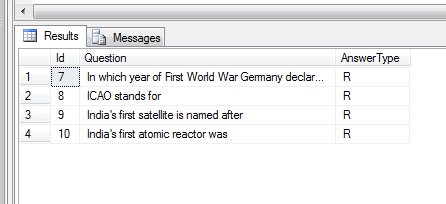
Fill this table with sample questions and lets quickly test : 

select * from quiz

Table QuizOption :

CREATE TABLE [dbo].[QuizOption](
 [Id] [int] IDENTITY(1,1) NOT NULL,
 [Questionid] [varchar](200) NULL,
 [Option] [varchar](200) NULL,
 [IsCorrect] [bit] NULL,
 [AnsType] [varchar](10) NULL,
PRIMARY KEY CLUSTERED 
(
 [Id] ASC
)WITH (PAD_INDEX  = OFF, STATISTICS_NORECOMPUTE  = OFF, IGNORE_DUP_KEY = OFF, ALLOW_ROW_LOCKS  = ON, ALLOW_PAGE_LOCKS  = ON) ON [PRIMARY]
) ON [PRIMARY]

Fill this table with sample quiz options and lets quickly test : 
select * from quizOption


Step 2) Create Procedures to Read Questions and its options.

Procedure Usp_ReadQuestions : 

CREATE PROCEDURE [dbo].[Usp_ReadQuestions]          
AS        
BEGIN      
 SELECT TOP(10)* FROM Quiz  
 ORDER BY NEWID()     
END 

Procedure Usp_ReadQuizOptionsById :
CREATE PROCEDURE [dbo].[Usp_ReadQuizOptionsById] @Id int AS BEGIN DECLARE @opts NVARCHAR(MAX); DECLARE @ids NVARCHAR(MAX); SELECT @opts = COALESCE(@opts+'*','') + qo.[Option], @ids = COALESCE(@ids+'*','') + CAST(qo.[Id] as varchar) FROM QuizOption qo WHERE qo.Questionid = @Id ORDER BY qo.[Id] SELECT @opts AS QuizOptions, @ids OptionIDs END
Lets quickly test this procedure by passing quiz id 9 and 10 to get its options by star separated: 
exec Usp_ReadQuizOptionsById 9
Output:

exec Usp_ReadQuizOptionsById 10
Output:

Step 3) We have already create models for quiz and its options in previous session i.e in part 2. Lets quickly check what we have done and enhanced in SampleMvc.Models :
Quiz Model :
using System;
using System.Collections.Generic;
using System.Linq;
using System.Text;

namespace SampleMvc.Models
{
    public class Quiz
    {
        public string Question { get; set; }
        public int QuestionId { get; set; }
        public string QuizOptions { get; set; }
        public string Answertype { get; set; }
    }
}
In QuizOptions Model :
using System;
using System.Collections.Generic;
using System.Linq;
using System.Text;

namespace SampleMvc.Models
{
    public class QuizOptions
    {
        public string Options { get; set; }
        public string IDs { get; set; }
    }
}
In QuizSet Model : We have created this model to retrieve quiz and all its
options to generate quiz set. In this model QuizOptions and OptionIDs will
hold star separated quiz options and all its options id. These Options and Ids will be splited and shown there on the screen.
using System; using System.Collections.Generic; using System.Linq; using System.Text; namespace SampleMvc.Models { public class QuizSet { public int QuestionId { get; set; } public string Question { get; set; } public string Answertype { get; set; } public string QuizOptions { get; set; } public string OptionIDs { get; set; } } }

Step 4) Create functions to call procedures to Read Questions and its options in SampleMvc.DA. 
Note : QuizDA inherits SQLHelper class(check for this class in previous session.)

using System;
using System.Collections.Generic;
using System.Linq;
using System.Text;
using SampleMvc.Models;
using System.Data.SqlClient;
using System.Data;

namespace SampleMvc.DA
{
    public class QuizDA : SQLHelper
    {
        public List<Quiz> ReadAllQuiz()
        {
            try
            {
                List<Quiz> questions = new List<Quiz>();
                SqlCommand cmd = new SqlCommand();
                cmd.CommandText = "Usp_ReadQuestions";              
                cmd.CommandType = CommandType.StoredProcedure;
                cmd.Connection = Connection;
                OpenConnection();
                SqlDataReader rdr = cmd.ExecuteReader();
                while (rdr.Read())
                {
                    Quiz quiz = new Quiz();
                    quiz.QuestionId = Convert.ToInt32(rdr["Id"]);
                    quiz.Question = rdr["Question"].ToString();
                    quiz.Answertype = rdr["AnswerType"].ToString();
                    questions.Add(quiz);
                }
                return questions;
            }
            catch
            {
                throw;
            }
            finally
            {
                CloseConnection();
            }
        }

        public QuizOptions ReadQuizOptions(int id)
        {
            try
            {
                QuizOptions quizoption = new QuizOptions();
                DataTable dt = new DataTable();
                dt = ExecDataTableProc("Usp_ReadQuizOptionsById", new SqlParameter("@Id", id));                
                quizoption.Options = dt.Rows[0]["QuizOptions"].ToString();
                quizoption.IDs = dt.Rows[0]["OptionIDs"].ToString();

                return quizoption;
            }
            catch
            {
                throw;
            }
            finally
            {
                CloseConnection();
            }
        }
    }
}

Step 5) Create action methods in controller class. We have created two action methods StartQuiz and ReadAllQuiz.

using SampleMvc.DA; using SampleMvc.Models; using System; using System.Collections.Generic; using System.Data; using System.IO; using System.Linq; using System.Web; using System.Web.Mvc; namespace SampleMvc.Controllers { public class EmployeeTestController : Controller { public ActionResult StartQuiz() { return View(); } public JsonResult ReadAllQuiz() { List<QuizSet> quizSet = new List<QuizSet>(); QuizDA quizDA = new QuizDA(); List<Quiz> quizs = quizDA.ReadAllQuiz(); foreach (Quiz q in quizs) { QuizOptions options = quizDA.ReadQuizOptions(q.QuestionId); if (options != null) { quizSet.Add(new QuizSet { QuestionId = q.QuestionId, Question = q.Question ?? string.Empty, Answertype=q.Answertype, QuizOptions = options.Options, OptionIDs = options.IDs }); } } return Json(quizSet); }
}
}

Step 6) Create view for action method StartQuiz

@{ Layout = null; } <link href="~/Contents/CSS/QuizTemplate.css" rel="stylesheet" /> <link href="~/Contents/W3Css/w3.css" rel="stylesheet" /> <div id="divQuiz" class="displayQuiz w3-container w3-teal"> </div> <script src="~/Scripts/jquery-3.2.1.js"></script> <script> $(document).ready(function () { displayQuiz(); function displayQuiz() { $.ajax({ url: '/EmployeeTest/ReadAllQuiz/', type: 'POST', contentType: "application/json", dataType: "json", success: function (data) { var count = 1; if (data.length > 0) { $.each(data, function (i, q) { if (q.Answertype == 'R') { var Opts = q.QuizOptions.split("*"); var OptIds = q.OptionIDs.split("*"); var numOptions = Opts.length; $(".displayQuiz").append("<h1 style='background-color: lightseagreen;'><div class='quiz'><span class='quizno'>" + (count++) + ".</span><span class='quizTitle'>" + q.Question + "</span></div></h1>"); $(".displayQuiz").append("<ul class='quizOption' id='optionList" + count + "'></ul>") for (i = 0; i < numOptions; i++) { $("#optionList" + count).append('<li><input style="width:20px;" type="radio" value=' + OptIds[i] + ' name="dynradio" qid="' + q.QuestionId + '" /><div class="leftOpt";">' + Opts[i] + '</div></li>'); } } }); } else { } }, error: function (response) { console.log(response); } }); } }); </script>

Last Step (Optional) : Set css as per your requirements. Sample is given below :
Use <link rel="stylesheet" href="https://www.w3schools.com/w3css/4/w3.css"> or import it.

In QuizTemplate.css

body {
}
ul {
    list-style: none;
}
.leftOpt {
    float: right;
    width:97%;
}
li {
    font-family: 'Roboto', sans-serif;
    padding: 10px 0;
    clear: both;
}
.quiz {
    padding-left: 10px;
}
.quizTitle {
    padding-left: 10px;

}